
GPS SPEED CAMERA LOCATOR - Radar detector INFORAD - Free user manual and instructions
Find the device manual for free GPS SPEED CAMERA LOCATOR INFORAD in PDF.


| Product type | GPS radar detector / warning device |
| Brand | INFORAD |
| Model | GPS SPEED CAMERA LOCATOR |
| Dimensions (estimated) | Approximately 80 x 50 x 20 mm |
| Weight (estimated) | Approximately 100 g |
| Power supply | 12 V via cigarette lighter adapter and provided USB cable |
| Main functions | GPS location, risk zone database, visual and audible alerts 20 seconds before, personal points recording, reporting of unlisted zones |
| Alert types | Visual (green, orange, red LED) and audible (beeps, continuous sound) |
| Mute button | Temporarily cuts the audible alarm |
| Insert button | Long press to memorize coordinates and add personal points or report risks |
| USB connector | Power supply, PC connection for updates and data transfer |
| External antenna connector | Option for vehicles with heat-reflecting windshield |
| Zone updates | Via configuration and update software on INFORAD website |
| Warranty | 1 year by standard exchange after online registration |
| Maintenance and cleaning | Clean with a dry, soft cloth. Do not use abrasive products. |
| Safety | Legal use, does not detect or jam mobile doppler or laser radars |
| Spare parts / Repairability | USB cable and cigarette lighter adapter provided. External antenna optional. Repair by technical support. |
| General information | Device designed to encourage caution and compliance with speed limits |
Frequently Asked Questions - GPS SPEED CAMERA LOCATOR INFORAD
User questions about GPS SPEED CAMERA LOCATOR INFORAD
0 question about this device. Answer the ones you know or ask your own.
Ask a new question about this device
Download the instructions for your Radar detector in PDF format for free! Find your manual GPS SPEED CAMERA LOCATOR - INFORAD and take your electronic device back in hand. On this page are published all the documents necessary for the use of your device. GPS SPEED CAMERA LOCATOR by INFORAD.
USER MANUAL GPS SPEED CAMERA LOCATOR INFORAD
INFORAD driving road safety
GPS Speed Camera Locator
GPS Avertisseur Radar
GPS Radarfallenwarngerät
GPS Radarverklikker
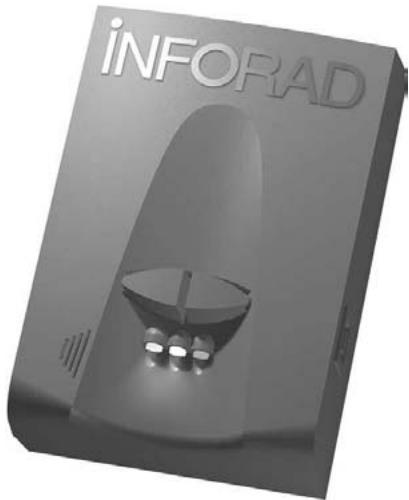
The GPS speed camera locator INFORAD was designed to incite caution and to help observe the traffic law. Like any other GPS device, its operating mode makes it perfectly legal and its usage on the road is therefore authorised. INFORAD does not detect presence and does not cause interference to doppler or laser mobile radars.

How does the GPS radar detector INFORAD work ?
INFORAD knows the vehicle's exact position and effective speed due to a network of GPS satellites.
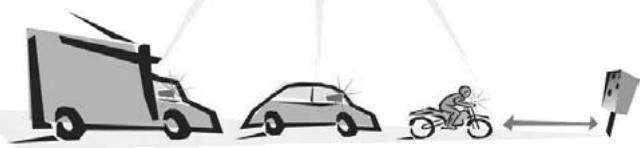
Thanks to its database, INFORAD constantly checks if a risk area, determined or not by automatic radar, exists on the vehicle route. INFORAD gives a warning 20 seconds before reaching the exact risk spot.
Quick start-up guide
Before installing the INFORAD receiver in your vehicle, we recommend that you read the following carefully and carry out the different actions in order, as described in this quick start-up guide.
Although your INFORAD unit was pre-loaded with the latest update available from factory, we advise that you only use it once you have checked using configuration software that a latest update is available on our server.
1 - After taking the different parts supplied with your GPS radar detector out of the packaging case, check, using the list available (on the sides of the packaging), that you have all of the accessories.
Quick start-up guide (2)
2 · Downloading configuration software and update
This software allows you to test the different functions of your INFORAD, to check if the latest update of risk areas is available, to adapt its configuration to your preferences and to manage or record your personal points.
This must be downloaded beforehand from the INFORAD site customer space at the following address: http://www.gpsinforad.com.
Install and follow the instructions supplied with the contextual aid and the integrated software guide. Then, on request, you should connect your INFORAD to the computer using the USB cable supplied. This will end the installation. During this stage you should also register to take advantage of a year's guarantee with standard replacement and the free subscription to updates.
3 • Installation of INFORAD in your vehicle
Install your unit on your dashboard at the nearest possible place of the centre of the windscreen, so that your unit has the largest possible view over the GPS network satellites.
Once this position is determined use the velcro® bands supplied to keep it in position. Now connect the USB cable to the cigarette lighter adapter supplied and connect the set to your unit, then insert the adapter into your vehicle's cigarette lighter socket.
4 • Start-up
The green diode of your INFORAD must be flash, indicating that your detector is on and that it has initiated the satellite search. This search, according to satellite visibility conditions, can last between 1 to 5 minutes. As soon as your locator has finished the satellite acquisition phase, the green diode stops flashing, thus indicating that your INFORAD is protecting you. (see the table of alerts on the following pages). If the green diode does not stop flashing after 15 minutes, start by checking in your vehicle's manual if it is fitted with a heat-absorbing windscreen. If this is the case you should make the acquisition of the miniature antenna an option. Otherwise, contact online support.
Technical online support
If you have difficulties during installation or use of your INFORAD radar locator, you can refer to the heading "Questions and Answers" on the site www.gpsinforad.com or contact our customer support by email : support@gpsinforad.com.
"Mute" Button :
this cuts the audible alarm momentarily.
Buzzer :
it emits sound beeps signalling each change in risk level. It also produces a continuous audible signal when, in a permanent risk area, the speed of the vehicle is higher than the authorised limit.
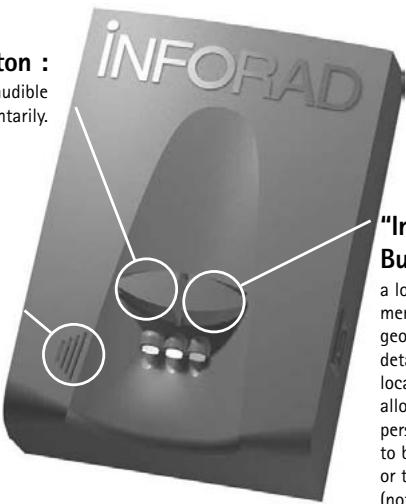
"Insert"
Button :
a long pressure memorises the geographical details of the location and allows the personal points to be captured or the risk areas (not classified otherwise) to be signalled.
Connector for external antenna :
Aimed for the connection of an external antenna (option) for vehicles fitted with heat-absorbing windscreen. The miniature external antenna is then substituted for an internal active antenna.
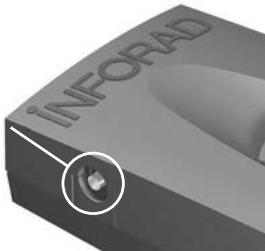
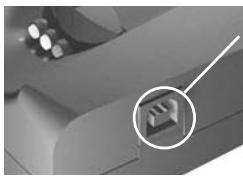
USB connector :
it allows :
- power supply by means of the USB cable and the cigarette lighter charger,
- connection with the computer for updates,
- transfer of data to the browser applications or during updates.
Table of visual and sound alerts
| BUZZER DIODES | No sound | 1 brief sound | 2 brief sounds | 3 brief sounds | Continuous sound |
| Flashing green | Absence of satellite signal INFORAD is not working | ||||
| Fixed Green | ↑ | SAFETY INFORAD protects you | |||
| Flashing Orange | CAUTION Approaching a potential risk zone | ||||
| Flashing Red | CAUTION Approaching a certified risk zone | ||||
| Flashing Red | DANGER Your speed is higher than the one permitted |
SiRF 12 channels capable of tracking 12 satellites simultaneously
Average acquisition time
Initialisation: 3mn 38 s when cold and 8 s after warming up
Update time
1.1 s
Accuracy
Position 10 meters (10.9 yards) RMS - speed < 1 Kph (0.62 mph)
Processor
RISC 32 bits ARM7 at 50MHz
Memory
Processor 128Kb - RAM 8Mb
Antenna
Active internal with connector for optional active external
Alarm
Audible and visual
Power supply
Cigar lighter adapter: Input: 12/24V DC, Output: 5V DC - 850 mA
Dimensions
193 mm x w 66 mm x h 30 mm - (3.66" x 2.6" x 1.18")
Weight
120 grammes (4.23 oz)
Can be simultaneously used as a GPS receiver - compatible NMEA-0183 v2.0 for navigation applications, running on PCs (cable provided) or Pocket PC (cable optional).
- Depending on local geographical conditions.
INFORAD driving road safety
INFORAD Ltd
14 Cluain Airne · Shannon
County Clare • Ireland
Contact: info@gpsinforad.com
Technical support: support@gpsinforad.com